The letter S, in dark yellow, in a curvy handrawn style Scribbles Updates

Changelog

  • ๐Ÿš€ Faster-loading post images โ€” inline images on your public blog now serve responsive sizes based on the reader's screen, so posts use less data on phones and tablets. Tap to open the lightbox and you still get the full-resolution original.

Small changes, but important.

โœŒ๏ธโค๏ธ

โ€” Vincent

Changelog โ€” July 2nd

Some smaller tweaks and fixes since the last few updates.

  • ๐Ÿ’… Homepage and Explore blog tiles are now fully clickable.
  • ๐Ÿ’… Swapped the main menu icons to new ones for clearer, more consistent visuals.
  • ๐Ÿ’… Keyboard shortcut badges now appear on hover in the expanded pinned sidebar.
  • ๐Ÿ’… Archived posts no longer show up on the main posts dashboard โ€” they're still on the dedicated archived page.
  • ๐Ÿ’… Rebuilt social preview image generation for posts and pages. Share cards should look sharper and more consistent.
  • ๐ŸŽจ Custom themes can now load external fonts via theme.yml, and you can delete themes and versions from the theme editor.
  • ๐ŸŽจ Analytics, Open Graph tags, favicons, feeds, and Kudos/Komments are injected automatically into custom themes โ€” no extra wiring needed.
  • ๐Ÿ› Restored sticky positioning on the editor toolbar. Thanks Bear!
  • ๐Ÿ› Fixed blog accent colour not applying in the post editor.
  • ๐Ÿ› Fixed Tinylytics analytics when a blog URL is relative.

New menu sidebar

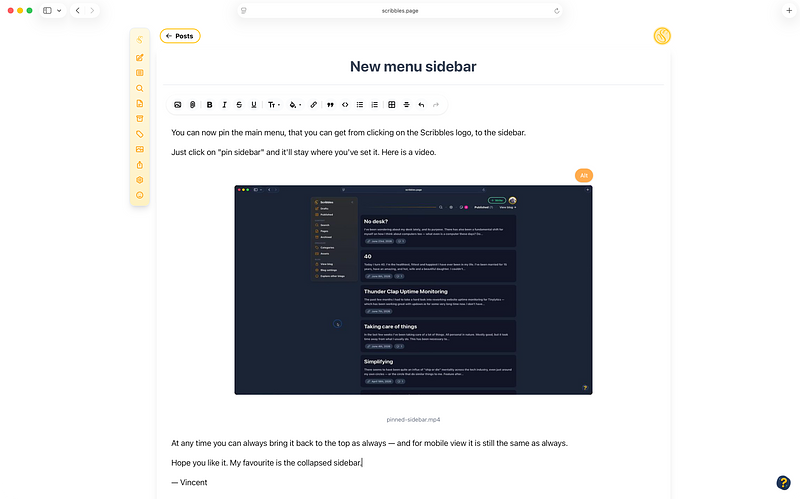
You can now pin the main menu, that you can get from clicking on the Scribbles logo, to the sidebar.

Just click on "pin sidebar" and it'll stay where you've set it. Here is a video.

At any time you can always bring it back to the top as always โ€” and for mobile view it is still the same as always.

Hope you like it. My favourite is the collapsed sidebar.

โ€” Vincent

Some smaller tweaks and fixes for you today, and as always, appreciate all the feedback and suggestions โ€” I know that sometimes I do not reply. Know that I read and know about all.

  • ๐ŸŒ„ You can now upload multiple images into the editor at once to create galleries in a series, instead of one by one. The lightbox on your blog post will then also show you a next arrow to cycle through these.
  • ๐ŸŒ„x2 Following on with images, you can now drag and drop them and change their positions more easily.
  • โœ๏ธ Multiple upgrades to the text editor in general to make everything work much nicer and smoother โ€” please let me know any changes that don't look correct to you.
  • โœจ Added an option, on your account settings page, to disable sticky notes if they are not your thing. Of note, I should actually announce that feature.
  • ๐Ÿค– Tweaked the API documentation to correctly show the upload flow for attachments when creating a post and added more details. Also added the ability to create alt text when uploading a post.
  • ๐Ÿ’… Tweaked the colouring of the pager in the default theme (version 2) to match the blog accent colour.
  • ๐Ÿ’… Tweaked the accessibility of category names in the themes so they are easier to read and see.
  • ๐Ÿ› Fixed an issue when a blog had text previews disabled, but then a post with no title would show nothing on the category or archive pages.
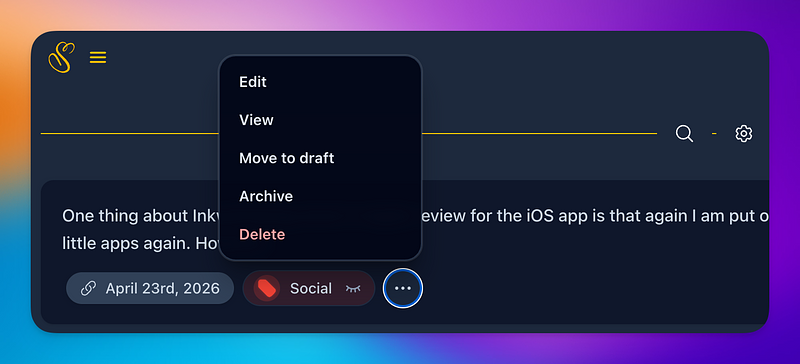
  • โœจ Added an action menu to your post list in the admin area, when you hover over them, so you can make quick changes as needed.
  • ๐Ÿ› Fixed an issue that would cause a shared draft to throw an error when trying to edit it.
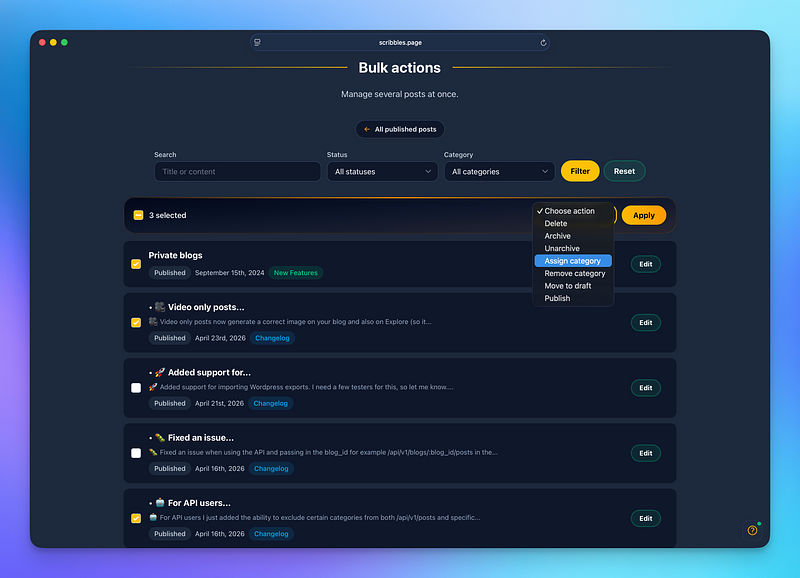
  • ๐Ÿš€ Added a new bulk actions screen allowing you to make changes to all your posts in one go โ€” whatever you fancy. But with great powers comes great responsibility. Find it on the "Published" posts section and select "Bulk Actions".
  • ... no inside joke this time around... but I wonder who will be first to... ๐Ÿ˜‚ Alright, alright โ€” having some fun.
  • Oh, and, on the published posts page you can also filter by upcoming/scheduled posts also.
  • ๐ŸŽฅ Video only posts now generate a correct image on your blog and also on Explore (so it doesn't look empty).
  • ๐ŸŽฅ When you have a video only post, the title shown to visitors no longer just says [Image] โ€” now it adds the correct word โ€” Video.
  • ... I might do more around this, so just let me know what you want to see.
  • ๐Ÿš€ Added support for importing Wordpress exports. I need a few testers for this, so let me know. You can run imports on your blog settings page under "import". Going to announce this more formally end of week or next. Also please email if you have questions. This was requested over the years, so it's finally here. Will add more import options for sure (and export too). Pulls in posts, categories and images.
  • โœจ In addition to this, I added the ability to create redirects to various parts to your Scribbles blog โ€” great when you have old URLs but pointing to a new post url here on Scribbles. I will also formally announce this. Imports will automatically create redirects. Find it in the blog settings page โ€” and also when editing posts.
  • For both above, I am calling these tests for now as I am still tweaking the UI and experience, although I think it's ready.
  • ... soon on other platforms perhaps. ๐Ÿค”๐Ÿคฃ OK, enough of this โ€” it's an inside joke. Thanks for playing. โค๏ธ
  • ๐Ÿ› Fixed an issue when using the API and passing in the blog_id for example /api/v1/blogs/:blog_id/posts in the path where it would also surface archived posts. Sorry about that.
  • ๐Ÿค– For API users I just added the ability to exclude certain categories from both /api/v1/posts and specific blog posts, just pass in a new parameter like exclude_category with the name or exclude_category_id with a given ID of the category to ignore. Additionally, you can return just uncategorised posts by passing uncategorized=true as a parameter.
  • ๐Ÿ™ƒ And if you don't use Scribbles, expect to see the same functionality in the other smaller blogging platforms soon too.
  • ๐Ÿง˜โ€โ™‚๏ธ And for what it's worth, Scribbles will not chase features for the sake of features โ€” everything will be organic and what feels right. Just because I have a great predictive auto complete now, doesn't mean I need to do more. OK, enough on that. โค๏ธ LOL
  • ๐Ÿ› Fixed an issue that may have caused pages to be saved as drafts, without you being able to publish them.
  • ๐Ÿงน By default the /feed.atom (ATOM feed) page will now be automatically served when someone lands on /feed
  • ๐Ÿ› Fixed an issue with deleting blogs.
  • ๐Ÿ’… Fixed an issue with navigating to the discover settings page from Explore.
  • ๐Ÿš€๐Ÿงช If you're running on a custom domain, including the Scribbles sub-domain, you can now access your site admin panel by appending /admin to the URL โ€” behind the scenes it will run your blog as a custom URL โ€” that means you can keep logged in on that site without issue. This is still experimental and am looking for feedback as you use it. Authentication only works for your blog in question. Sign up and other auth related logic will not work on custom domains โ€” only on scribbles.page. If you have multiple blogs you can still manage these on a site by site basis and of course on the main scribbles.page domain as always โ€” no changes to this. This is optional and not required to use Scribbles in any way.

Please let me know how it works for you.

This change is intended for longer term plans.

โœŒ๏ธ

  • โœจ You can now change your blog slug if you need to โ€” this does not affect custom domains really.
  • โœจ You can also now easily activate your given blog slug as a subdomain with ease, without having to worry about DNS settings or otherwise.
  • ๐Ÿ’… Regarding blog slugs, it now gives you some suggestions also that you can quickly use if you so wanted โ€” or add your own. I like the random generated ones, but don't blame you for wanting to change anything.
  • ๐ŸŽ† Fixed an issue with the Scribbles default favicon being loaded when a feed reader would ignore what was set on your blog โ€” it is now blog aware and redirects the default favicon to the correct one if you have an image set. Thanks Nick!
  • โœ๏ธ When you receive a "scribble" via email and click the link, it will now take you to the Incoming Scribbles screen instead, with it correctly filtered and shown. This is good in general and improves the experience when you have multiple blogs.
  • โœจ When your blog isn't discoverable on the Explore page we show a small call to action to add it โ€” however you can also dismiss this notice on a blog by blog basis if you have multiple. Just nice to have. Click on "Dismiss" and you're done.
  • โœŒ๏ธ You can now cancel and resume subscription from within the billing page without having to go to the hosted billing portal.
  • ๐Ÿงน If you're on a trial it's now clearer when the trial ends and your subscription starts.
powered by Scribbles