
Share a blog with family and friends
New FeaturesHowdy! Big update today: you can now share your blog (and your subscription) with family, friends, or collaborators so multiple people can write together — no extra payments needed.
Whether it’s a family memory blog, a shared travel journal, or just you and a friend co-writing, this makes it super easy for everyone to contribute using the same Scribbles subscription.
It's super easy to get started: Head over to your blog settings → Family & Collaborators. Enter their email address and hit “Create invite”.
By default, Scribbles sends them a nice email with a special invite link. Or you can copy the link yourself and send it however you like (whatever works).
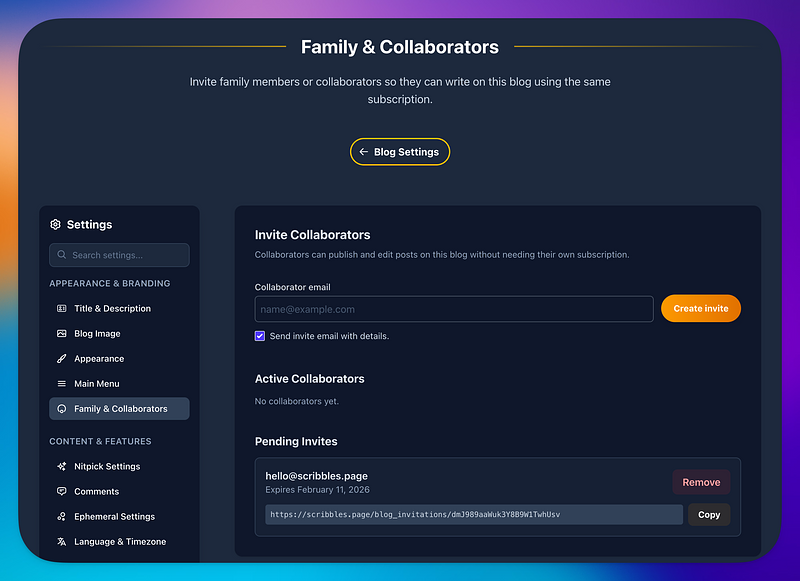
If they don’t have a Scribbles account yet, they’ll be invited to sign up right there. All they need to do is verify their email (just like normal), and once they’re in they’re automatically added to your blog. Easy.
The beauty: Their account automatically inherits your subscription for that blog, so Scribbles is fully unlocked for them — no trial, no nagging upsell (promise ✌️), no hassle. No "what's the password again?".
And if they later want their own separate blog? They can create one anytime (which starts their own trial), and they’ll never lose access to the shared one. Everyone keeps logging in as themselves — no shared passwords, win-win.
This is my first pass at the feature, and I really want it to feel right for the people who’ll use it most — families, writing buddies, maybe even small teams. If anything feels off, confusing, or if you have ideas to make it even better, please let me know. You know where I am.
I hope this makes shared blogging smoother and more personal for some of you.
Now go invite someone to write with you — happy writing together!
More coming!
— Vincent ✌️❤️